Work Board And Scheduler
The Work board is where intent turns into agent work.
It gives humans and agents the same shared task surface. Scheduler handles the work that should happen later or repeat in the background.
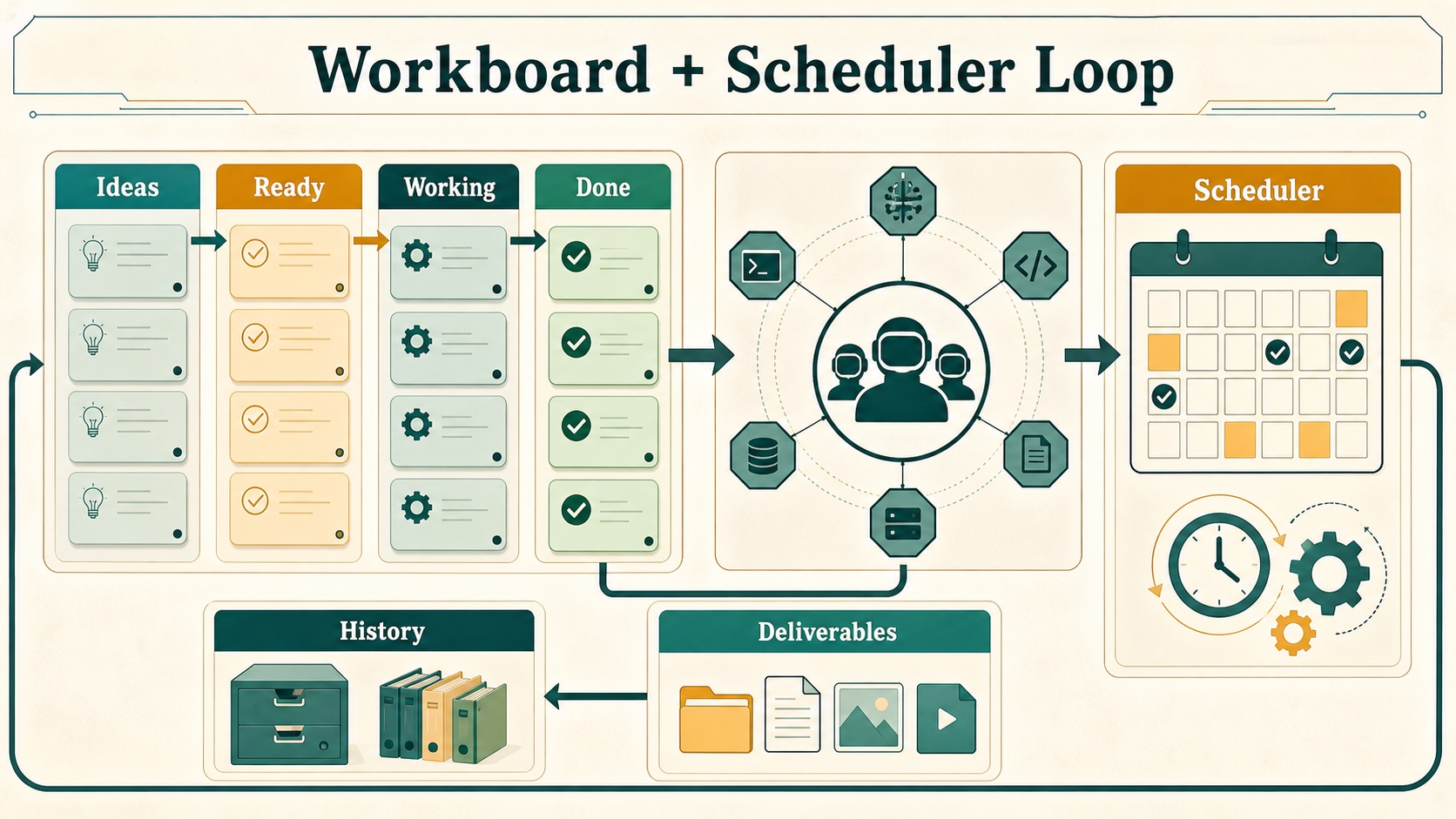
Work Board
How it works:
- API route:
/api/kanban. - Storage service:
src/lib/services/kanban/local-kanban-store.ts. - Shared-vault storage is preferred under the configured Obsidian Kanban folder.
- Local fallback storage is
~/.hivemindos/kanban. - Project provenance metadata is stored separately in
Operations/Code Projects/projects.json, with~/.hivemindos/projects.jsonas fallback. - Agent dispatch is handled in
use-kanban-dispatch-controller.
Columns:
| Column | Purpose |
|---|---|
| Ideas | Capture rough thoughts that should not run yet |
| Waiting for Queen | Ready for assignment |
| Working | Claimed by an agent |
| Needs You | Blocked on access, approval, or a decision |
| Done | Completed with notes, evidence, result, or deliverables |
| Archived | Hidden from the main board but retained |
What the Work board can do:
- Create and switch named boards.
- Create, update, move, archive, and delete tasks.
- Filter by tenant, assignee, search text, and archived state.
- Bulk move or bulk assign selected cards.
- Dispatch tasks to agents.
- Detect stale or no-progress work.
- Preserve agent sessions on cards.
- Store attachments, linked directories, target machines, comments, events, run records, child links, and deliverables.
- Optionally attach a Hivemind project to a task with
projectId. - Preserve sanitized GitLawb proof records on cards through optional
proofs. - Show compact Code Proof badges for project-linked tasks.
- Extract local paths and URLs from completed output into deliverables.
- Roll completed child deliverables into parent handoff tasks while filtering planning/source artifacts.
- Open or reveal deliverables through
/api/kanban/deliverable. - Import tasks from notes through
/api/note-intake. - Use machine-aware directory picking for linked folders: native picker for This Mac in desktop builds, collector directory browsing for remote machines, and API fallback in the browser.
- Capture quick-add text, files, images, directories, target machine, and voice transcripts directly in each lane.
- Steer active tasks with comments, attachments, target-lane selection, and interruption/reclaim actions.
Note Intake And Work History
The Work surface also acts as an audit and intake console:
/api/note-intakescans configured vault folders for unchecked markdown tasks and “Next action” sections, then imports selected items into Ideas.- The board settings surface controls note-intake enablement and folder scope through the shared-vault config.
/api/work-historyreads dynamic changelog and repository activity, then supports project filters, text search, paging, and append loading in the History tab.- Work History is rendered beside Workboard, Automations, and Simulation so local changes and agent work stay visible without leaving the control room.
Project Provenance
The Work board can link tasks to Hivemind projects without forcing every task to be part of a repo.
How it works:
GET /api/projectsreads the project registry.POST /api/projectscreates or updates a project.POST /api/projects/link-gitlawblinks a project to GitLawb repo metadata.- Kanban task records can include
projectIdand sanitizedproofs.
This lets one machine work across many projects and many GitLawb repos. The shared Brain keeps private task and memory context. GitLawb carries public-key code provenance.
Scheduler
How it works:
- Shared schedule files are stored through
src/lib/services/obsidian/scheduled-runs.ts. - Runtime schedule APIs are exposed through
/api/runtimes/[runtime]/schedulesand/api/scheduler/runtime-action. - Scheduler UI behavior lives in
src/features/dashboard/hooks/use-scheduler-controller.tsx. - Skill-backed actions use
/api/scheduler/skill-action. - Local folder browsing can use the Tauri native filesystem bridge through
src/lib/native/filesystem.tsbefore falling back to/api/scheduler/browse-folder.
What Scheduler can do:
- Create and import schedules.
- Run, pause, resume, and inspect runtime schedules where supported.
- Track past scheduled runs in the shared vault.
- Browse folders and attach runtime or skill context.
- Route scheduled prompts through supported agents.
- Expand or collapse long schedule descriptions without silently truncating them.
- Show run-state phases such as assigned, thinking, executing, wrapping, and done.
- Create new jobs from the scheduler rail and use cadence templates for cron, interval, daily, weekday, and market/session-like schedules.
AEON Deliverables And Scheduled Work
AEON work now has a stronger handoff loop:
/api/runtimes/aeon/deliverablesdiscovers recent artifacts from the shared vault and local AEON output folders.- AEON repo cards can show new deliverable counts.
- The Deliverables tab renders artifact cards with readable titles, excerpts, facts, open/download actions, and download-to-machine flows.
- Scheduler controls can be embedded in AEON context so scheduled background work and repo deliverables stay connected.
Main Code Paths
src/app/api/kanban/route.tssrc/app/api/kanban/deliverable/route.tssrc/app/api/note-intake/route.tssrc/app/api/work-history/route.tssrc/lib/services/kanban/local-kanban-store.tssrc/lib/services/projects/project-registry.tssrc/lib/services/gitlawb/gitlawb-service.tssrc/lib/services/notes/note-task-intake.tssrc/lib/services/work-history/dynamic-changelog.tssrc/features/dashboard/views/KanbanPanel.tsxsrc/features/dashboard/hooks/use-kanban-task-controller.tsxsrc/app/api/projects/**src/app/api/gitlawb/**src/features/dashboard/hooks/use-kanban-dispatch-controller.tsxsrc/features/dashboard/hooks/use-scheduler-controller.tsxsrc/components/scheduler/**src/features/dashboard/views/AeonAutopilotPanel.tsxsrc/features/dashboard/views/AeonDeliverablesPanel.tsxsrc/app/api/runtimes/aeon/deliverables/route.tssrc/lib/native/filesystem.ts