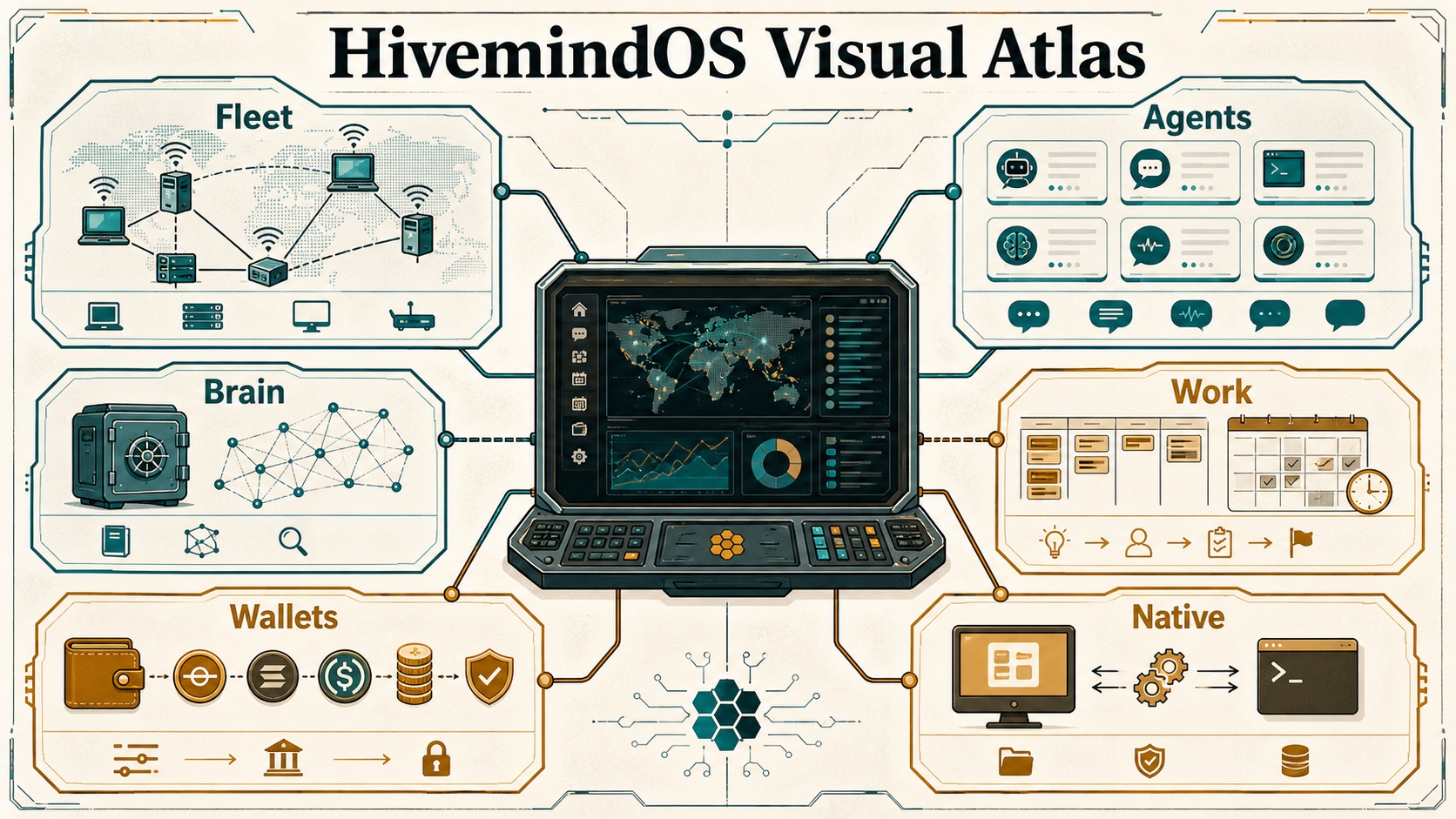
Local-first fleet manual
HivemindOS Documentation
A compact operator map for agent fleets: local machines, Tailnet collectors, shared Obsidian memory, runtime adapters, background work, wallets, token rails, Honey, HIVE, simulations, and integration surfaces.
- GitHub Pages ready
- Private Tailnet posture
- Next.js 16 / React 19
- Tauri desktop target
- Collector-first fleet model
Start Here
Feature Guide
Tour the product surface by domain: Fleet, agents, chat, work, scheduler, brain, env, files, notifications, MiroShark, wallets, token rails, Honey, HIVE, and x402.
Open featuresDiagrams And Maps
Use the visual atlas for generated infographic plates, system flowcharts, wallet/token diagrams, trust boundaries, scheduler loops, runtime maps, and storage maps.
Open visual atlasWallets And Tokens
Follow agent wallets, Base/Solana token handling, UsePod prepaid deposits, MoneyClaw keys, Honey rewards, Bankr HIVE claims, and x402 payments.
Open wallet docsGitLawb Code Proof
See how HivemindOS keeps the private agent work trail while GitLawb proves the code that shipped.
Open GitLawb docsArchitecture
Follow the process boundaries, route groups, collector responsibilities, storage model, and safety-sensitive networking paths.
Open architectureWhole Brain
Understand the shared Obsidian vault, canonical folder map, brain services, shared skills, sync health, and architecture sync rules.
Open whole brainHivemind Sync
See how shared brain files, shared env, and handoff transfers move between trusted machines.
Open sync docsRuntime Guides
Review runtime-specific setup and behavior for Hermes, AEON, and the adapter layer that keeps runtime surfaces consistent.
Open runtimesCalling
Call HivemindOS agents from the dashboard or paired mobile app, with BYOK Realtime calls by default and Cloud/LiveKit rooms as the paid path.
Open calling docsMonetization
See the free-vs-paid boundary, ecosystem plan, Honey and HIVE model, treasury strategy, and premium service paths.
Open monetization docsProduct Guidance
Keep the control room coherent with the design philosophy and UI rules that shape HivemindOS workflows.
Open product docsCurrent Surface
The codebase now spans more than the original Fleet, Work, Brain, Chat, and Wallet shell. The current dashboard also includes:
- My Apps: hivenet app and API-service discovery with icon proxying, health checks, service-kind signatures, OpenAPI/Hivemind route catalogs, route copy actions, and safe open links.
- AEON: repository/workspace management, local clone/link flows, GitHub-backed duplicates, scheduler handoff, brain access, and deliverable discovery/download/transfer.
- Swarm: MiroShark template-driven simulations, scenario helpers, archive loading, X/polymarket/reddit-style outputs, run intelligence, publish actions, and analysis-agent selection.
- Brain Services: Obsidian graph, shared skills, GBrain, Syntho, trading brain install/status, service notes, Synthesis folder configuration, source access policy controls, vault doctor, and whole brain architecture docs.
- Wallets, Tokens, and Usage: per-agent wallets, Base/Solana token rails, MoneyClaw key validation, UsePod prepaid status, x402 smoke tests, encrypted wallet-vault backup/restore, Honey observation, and Bankr HIVE claims.
- GitLawb Code Proof: lightweight CLI/DID setup, project registry, task proof badges, Fleet Code Node status, and lazy local repo node hosting.
- Work History and Maintenance: dynamic changelog history, note-to-Kanban intake, bulk task triage, process/heap memory telemetry, and conservative local repair actions.
- Native Desktop: a Tauri shell that can read desktop status directly and use native local folder browsing/creation while preserving the browser API fallbacks.
- Phone: gateway-backed phone pairing, scheduled/ring-agent calls, dashboard LiveKit calls, AEON call context, and mobile push readiness checks.
GitLawb Code Proof
AI agents need more than a place to put tasks. They need memory, project context, machine routing, work history, and a way to prove what code actually shipped.
That is the split between HivemindOS and GitLawb. HivemindOS is the private control room. It keeps the agent trail, the project map, the machine context, and the operator workflow. GitLawb is the signed proof layer. It gives code work a local identity, repo provenance, and an optional code node when a project needs local repo hosting.
The default stays simple. Setup can make Code Proof ready with the lightweight GitLawb CLI and a local DID, while the heavier node path waits until it is actually useful. Most users should just see that their code work can be linked and proven without becoming protocol experts.
One machine can work across many projects. Each project can link to its own GitLawb repo, and Work tasks inherit the right proof context from the project. The private Brain stays private. The code proof stays clean.
How It Fits
HivemindOS remembers the work. GitLawb proves the code. That is the trust layer for agent shipped software.
Read the integrationWhere It Shows Up
Setup prepares Code Proof, Work shows proof badges, Fleet can show Code Node status, and Integrations keeps the deeper controls out of the daily workflow.
See the Work loopRepository Overview
The app is a Next.js 16 / React 19 project using the App Router. The primary dashboard lives in src/features/dashboard, route handlers live under src/app/api, runtime-specific logic lives under src/lib/services, native desktop adapters live under src/lib/native and src-tauri, and optional Cloudflare Workers live under workers/.
Core commands:
pnpm dev
pnpm lint
pnpm typecheck
pnpm build
Port 5020 is the normal managed dashboard port. Project rules reserve that port for Liam’s managed dev server, so ad hoc testing should use 5021 or higher unless explicitly directed otherwise.
Architecture At A Glance
flowchart LR
User["User browser"] --> Dashboard["Next.js dashboard"]
Dashboard --> Api["App Router API routes"]
Api --> LocalFiles["Local app files and runtime homes"]
Api --> Vault["Shared Obsidian vault"]
Api --> Collector["Local collector"]
Api --> Tailnet["Tailscale / Hivemind Link"]
Tailnet --> RemoteCollectors["Remote collectors"]
Collector --> Runtimes["Hermes / OpenClaw / Aeon / Local OpenAI"]
RemoteCollectors --> RemoteRuntimes["Remote runtimes"]
Api --> Wallets["Wallets / tokens / x402"]
Api --> Workers["Honey ledger and compute gateway workers"]
Api --> Companions["GitLawb / MiroShark / Nango / Syncthing"]
Current Audit Snapshot
This documentation reflects a code audit of the repository on 2026-06-01 WITA. The main code paths checked were:
- Dashboard shell and views:
src/app/page.tsx,src/features/dashboard/**,src/components/** - API facade:
src/app/api/** - Runtime adapters:
src/lib/services/runtime-adapters/** - Shared state services:
src/lib/services/kanban/**,src/lib/services/obsidian/**,src/lib/services/brain/** - Code proof services:
src/lib/services/gitlawb/**,src/lib/services/projects/**,src/app/api/gitlawb/**,src/app/api/projects/** - Native desktop bridge:
src/lib/native/**,src-tauri/src/lib.rs,src-tauri/capabilities/default.json - Fleet/app discovery:
src/app/api/fleet/**,src/features/dashboard/views/MyAppsPanel.tsx,src/components/fleet/** - Scheduler, Swarm, AEON, Phone, and Integrations views:
src/features/dashboard/views/**,src/components/scheduler/**,src/components/swarm/** - Collector and setup scripts:
scripts/agent-telemetry-collector.mjs,setup.sh,uninstall.sh - Workers:
workers/honey-ledger,workers/compute-gateway