Tailscale Fleet Telemetry
HivemindOS monitors agents across machines by polling a tiny read-only collector over a private Tailscale or Hivemind Link path.
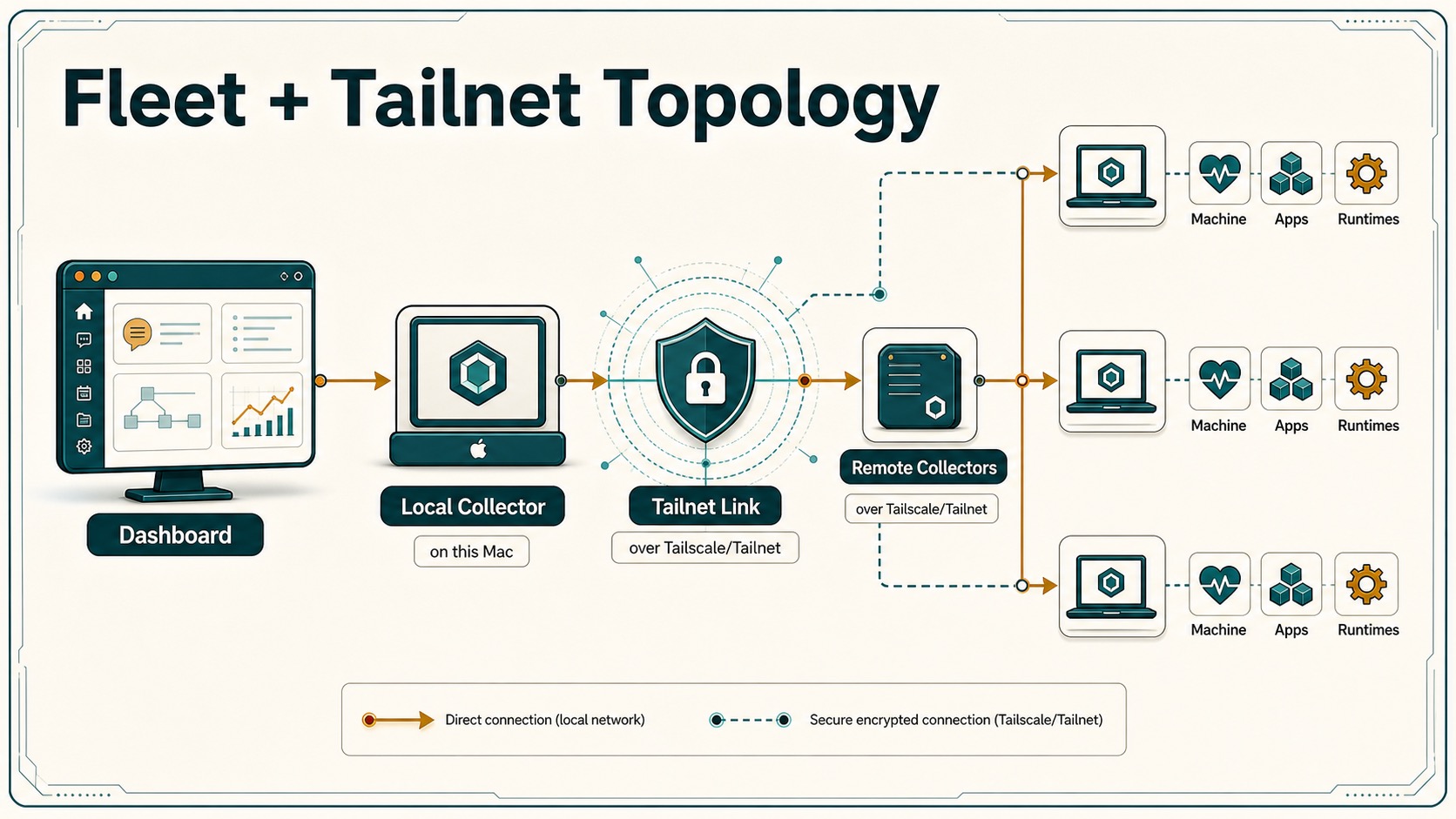
How It Works
Each machine that runs agents starts:
AGENT_TELEMETRY_PORT=8787 node scripts/agent-telemetry-collector.mjs
The collector exposes:
POST /snapshot
It only reads local agent state:
- Hermes:
~/.hermes/state.db,~/.hermes/sessions,~/.hermes/logs - Generic runtime dirs:
tasks,inbox,outbox,cron,logs,sessions - Local process list, used only as a coarse running/not-running signal
It does not write files, mutate agents, install packages, or expose raw secrets.
Install On A Machine
On macOS or Linux:
./scripts/install-telemetry-collector.sh
The installer prints a Tailscale URL like:
http://100.x.y.z:8787
Paste that into an agent card’s Telemetry URL field.
Tailscale Setup For Open Source Users
Recommended shape:
- Install Tailscale on each agent machine.
- Keep the collector private to the Tailnet. Do not use Funnel by default.
- Use Tailscale ACLs so only the control-room device can reach port
8787. - Use tagged devices such as
tag:agent-nodeandtag:agent-control-room.
Minimal ACL idea:
{
  "acls": [
    {
      "action": "accept",
      "src": ["tag:agent-control-room"],
      "dst": ["tag:agent-node:8787"]
    }
  ]
}
Hivemind Link Setup
Normal setup uses the app-managed Link sidecar by default. For collector-only installs on additional machines, run:
HIVE_LINK_ENABLED=true ./scripts/install-telemetry-collector.sh
This builds and starts hivemind-linkd, an embedded tsnet reverse proxy. The
collector binds to 127.0.0.1, and the sidecar exposes port 8787 only through
the user’s own Tailscale account. The sidecar also serves local status at:
http://127.0.0.1:8788/status
When no system Tailscale route exists, the dashboard reaches remote collectors
through the local sidecar’s /peer/<host:port>/... proxy instead of dialing
Tailnet IPs directly.
Keep these URL shapes distinct:
- Local collector:
http://127.0.0.1:<collector-port>/... - Local Hivemind Link sidecar:
http://127.0.0.1:8788/status - Remote collector through Link:
http://127.0.0.1:8788/peer/<tailnet-host%3A8787>/...
Only the local collector port may move, for example from 8787 to 8789 when 8787 is already occupied. The active local collector port is recorded in ~/.hivemindos/collector.env. Do not rewrite Link /peer/... URLs to that collector port. /peer/... belongs to hivemind-linkd on 8788, and rewriting it makes remote chat look like a missing Hermes chat bridge with a fast 404.
If the embedded node needs authorization, setup prints a Tailscale sign-in URL. No HivemindOS server proxies model or collector traffic.
Use ./setup.sh --system-tailscale only when you want the full system Tailscale
setup surface for Tailscale SSH, rsync repair, and HivemindOS-managed Syncthing
peer addressing.
For a public template, the smooth path is:
npx agent-control-room init
npx agent-control-room install-collector
The first command can discover Tailscale devices. The second can install the collector and print the private Tailnet URL to add to the dashboard.