Brain, Vault, And Skills
Brain and Vault is the shared memory layer.
It is built around a normal Obsidian markdown vault, not a proprietary database. That matters. The user can open the files, sync them with tools they already trust, and see what the agents are using as shared memory.
For the separated GitHub Pages guide, start with Whole Brain. That section splits the brain into Vault Map, Brain Services, Shared Skills, Shared Env, Sync And Health, Architecture Sync, and Code Map. For cross-machine movement, see Hivemind Sync.
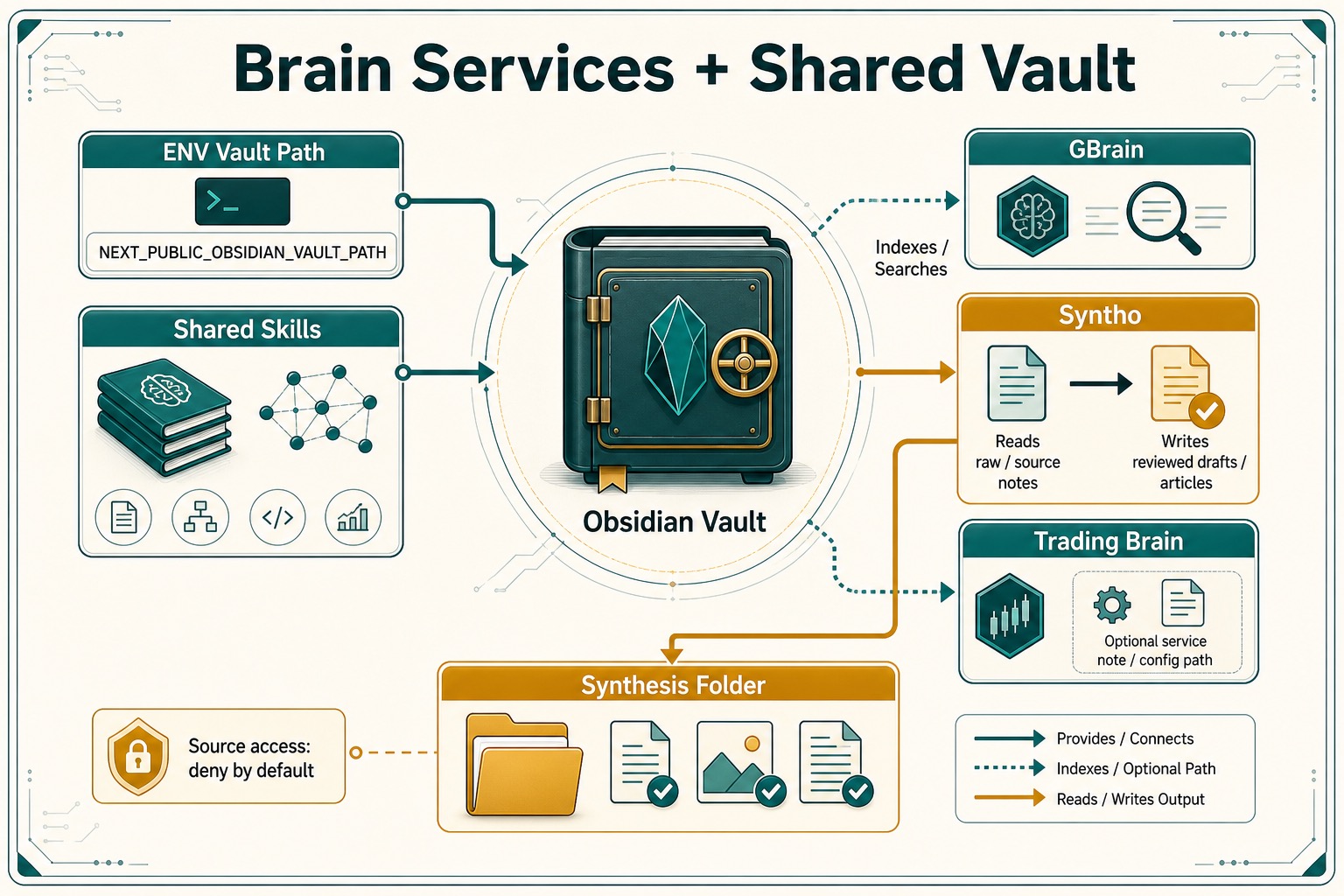
Vault
How it works:
- Vault path resolution is in
src/lib/services/obsidian/vault-path.ts. - The default vault path is
~/Documents/Obsidian/hivemindos-vault. - The app can use
NEXT_PUBLIC_OBSIDIAN_VAULT_PATHor auto-detect common Obsidian locations. - Hivemind Sync moves brain files through the selected vault sync owner: external provider, HivemindOS Syncthing, or manual rsync repair.
- Handoff transfers live in
.hivemindos-transfers/and are routed withhive-transfer.
What the vault can do:
- Validate and open a configured Obsidian vault.
- Record note access events.
- Build a graph of notes and access history.
- Store Kanban board state, project registry metadata, notifications, scheduled runs, wallet records, shared skills, and brain-service notes.
- Seed an AI ready vault contract, durable note templates, optional Obsidian CLI/plugin-pack status notes, and disabled foundation workflows for common shared brain routines.
Seeded structure:
Operations/AI-Ready Vault Contract.mdexplains the shared brain routing and write policy.Operations/Secure/stores encrypted backup artifacts and public key reference notes. Plaintext secrets do not belong in the vault.Operations/Runtime Mirrors/stores operational runtime mirrors such as the hidden AEON.aeonmirror.Operations/Vault Migrations/stores vault-doctor cleanup manifests and archived stale artifacts.Templates/HivemindOS/contains durable templates for daily briefings, weekly reviews, meetings, research sources, decisions, projects, book notes, distillations, and AI outputs.Operations/Brain Services/Obsidian CLI.mdrecords detected CLI status when setup runs.Operations/Brain Services/Obsidian Plugin Pack.mdlists optional manual Obsidian plugins for templates, tasks, Dataview, retrieval, calendar, Kanban, and Git.Operations/Automations/Foundation Workflows/contains disabled workflow schedules for context synthesis, intake processing, meeting processing, research ingestion, vault health checks, decision review, argument building, book notes, feedback capture, project updates, weekly synthesis, connection finding, and distillation.Operations/Code Projects/projects.jsonstores Hivemind project records and optional GitLawb repo links. This is private coordination metadata. GitLawb proof records should not contain private keys, secrets, Tailnet IPs, or exact private vault paths.
Brain Graph, GBrain, Syntho, And Trading Brain
How it works:
- Context index generation is in
src/lib/services/context-index.ts. - Brain graph generation is in
src/lib/services/obsidian/brain-graph.ts. - GBrain actions are in
src/lib/services/brain/gbrain.ts. - Syntho actions are in
src/lib/services/brain/synto.ts. The internal API slug and installed CLI command remainsynto. - Trading-brain install/status lives in
src/lib/services/brain/trading-brain.ts. - API routes live under
/api/context-index,/api/brain/gbrain/*,/api/brain/synto/*,/api/brain/trading-brain/*, and/api/obsidian/graph.
What the brain services can do:
- Build a lightweight context index over shared/runtime skills, tool-call surfaces, API routes, connected Tailnet apps, app endpoint catalogs, runtime capability definitions, docs, and workspace files.
- Retrieve the most relevant index records for a task before loading full files or schemas, including connected-app capability aliases such as image generation, simulation, graph, exports, monitoring, settings, and API docs.
- Optionally ask GBrain for semantic retrieval alongside the lightweight index when a caller posts
semantic: trueto/api/context-index. - Write a managed connected-app retrieval snapshot into
Operations/Brain Services/Connected Apps Context Index.mdand refresh GBrain import/embed when a caller postssyncConnectedAppsToGbrain: true. - Build a graph from markdown notes and access logs.
- Show a Brain Services cockpit with service health summaries, primary actions, advanced settings, structured run output, and repair guidance when local prerequisites are missing.
- Install or connect GBrain.
- Import the vault into GBrain.
- Embed, dream, and query through configured GBrain commands.
- Install or connect Syntho.
- Initialize the
Synthesisfolder as a Syntho vault. - Run Syntho pipeline, maintain, compare, eval, doctor, query, and pack export commands.
- Record the Syntho MCP command and source access policy in the brain service note.
- Keep Syntho raw source MCP access denied by default unless the user explicitly changes the source access policy.
- Attach trading-brain status to selected runtimes where configured.
- Write service notes back into the vault.
Syntho Model
Syntho is an optional reviewed-memory compiler for the Synthesis folder. It is not a replacement for the raw vault. HivemindOS tracks:
- CLI path and install mode.
synto.tomland.synto/state.dbinitialization state.- Counts for raw files, drafts, articles, sources, queries, synthesis notes, and exported pack files.
- MCP mode, MCP command, exposed tool names, and source access mode.
- Compare model, confidence threshold, and whether high-confidence changes can be auto-approved.
The dashboard writes these settings into Operations/Brain Services/Syntho.md and mirrors them into shared-vault config so other agents can see the intended policy.
Shared Skills
How it works:
- Shared vault index:
Skills/README.md. - Shared skill files:
Skills/<slug>/SKILL.md. - Skill services live in
src/lib/services/obsidian/brain-skills.ts. - Runtime provider inventory is read locally and through collector skill endpoints.
- Auto-sync config is stored under
~/.hivemindos/skill-auto-sync.json.
What shared skills can do:
- List installed runtime skills.
- Import runtime skills into the shared brain.
- Write new shared skills.
- Save Hive Fusion generated skills into the shared brain for later retrieval.
- Reconcile shared-vault skills with local runtime providers.
- Auto-import, auto-update, and optionally track removals per provider.
- Sync shared skills to Aeon.
See also: Hive Fusion, which explains how capability search turns prompts into shared-brain skills.
Main Code Paths
src/lib/services/obsidian/vault-path.tssrc/lib/services/context-index.tssrc/lib/services/obsidian/brain-graph.tssrc/lib/services/obsidian/brain-skills.tssrc/lib/services/brain/gbrain.tssrc/lib/services/brain/synto.tssrc/lib/services/brain/trading-brain.tssrc/lib/services/chat/shared-vault-context.tssrc/app/api/obsidian/**src/app/api/context-index/route.tssrc/app/api/brain/gbrain/**src/app/api/brain/synto/**src/app/api/brain/trading-brain/**src/features/dashboard/views/VaultPanel.tsxsrc/features/dashboard/hooks/use-miroshark-brain-controller.tsx
See also: Syncing And Tailscale Architecture.