Fleet
Fleet is the machine view.
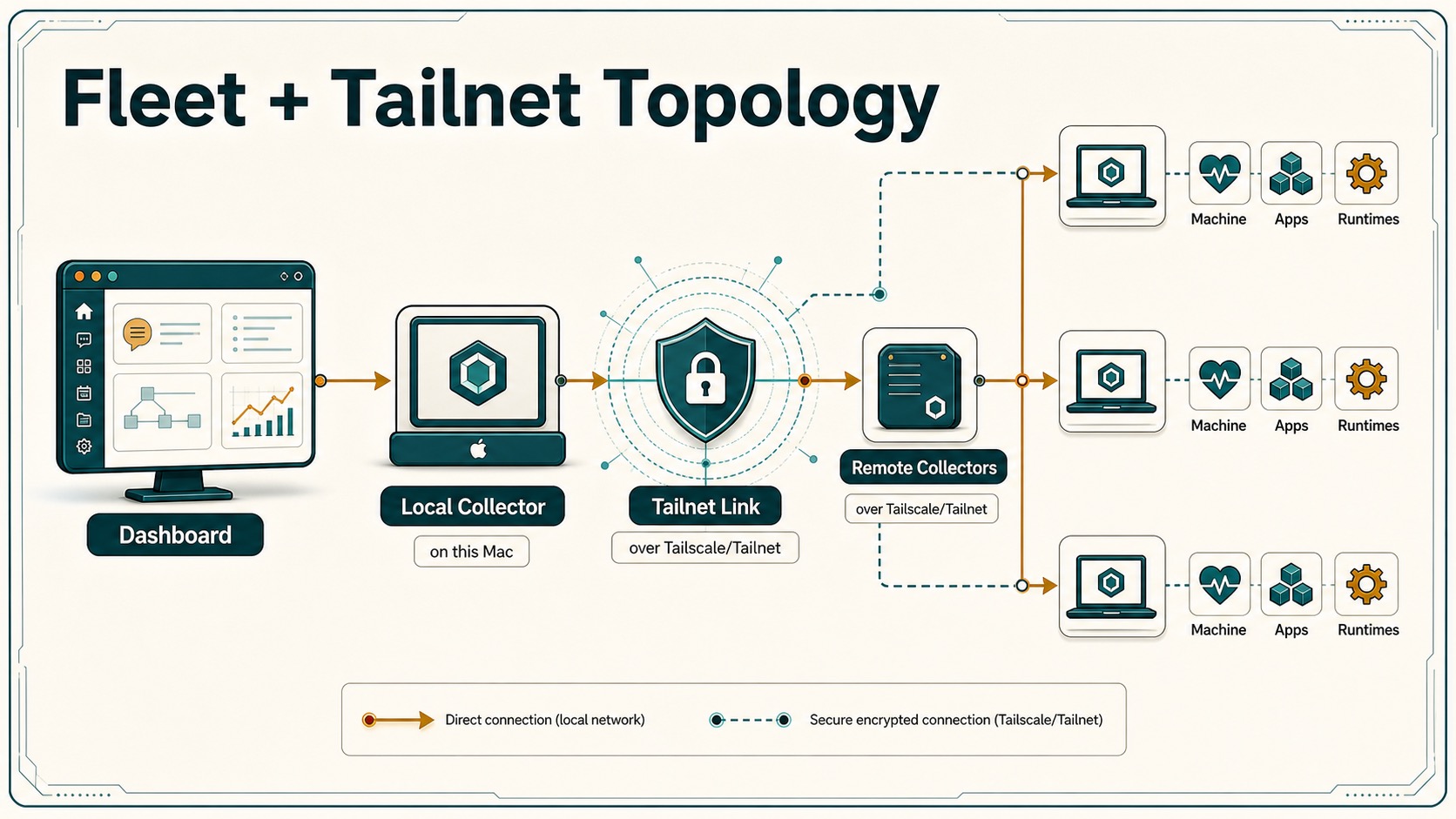
It shows what is online, what is reachable, which agents are running, which apps exist on the hive, and which machines need attention. The point is simple: before you ask an agent to do work, you should know where it lives and whether that machine is healthy.
How It Works
- The dashboard polls
/api/fleet/discoverand/api/fleet/snapshot. - The My Apps surface polls
/api/fleet/appsand proxies icons through/api/fleet/app-icon. - Discovery reads local collector settings, Tailscale/Link state, and reachable collector health.
- Snapshots merge local profiles, remote collector reports, runtime status, tasks, alerts, and capability flags.
- The local primary machine can show GitLawb Code Node/Code Proof status from
/api/gitlawb/status. - Machine identity helpers in
src/features/fleet/fleet-identity.tskeep local, Link, Tailscale, and remote machine labels stable. - Collector data comes from
scripts/agent-telemetry-collector.mjs, usually through Tailscale or Hivemind Link. - Connected-app notifications are coordinated by
use-fleet-notifications-controller.tsx, active app matching insrc/components/fleet/active-apps.ts, and app details inMyAppsPanel.tsx.
What Fleet Can Do
- Local and remote machine cards.
- Runtime and agent visibility.
- Collector health and version checks.
- Remote update action through
/api/fleet/update. - Machine provisioning helpers, including Hetzner-related setup routes.
- Directory browsing on capable collectors.
- Duplicate-machine handling across Link, Tailscale, loopback, and collector reports.
- My Apps launcher for discovered interactive apps and API services.
- API-service detail cards with health URL, base URL, service kind, route catalog source, grouped endpoints, route copy actions, and safe GET open links.
- Known-service fallback catalogs when a service lacks OpenAPI but HivemindOS can identify it, currently including MiroShark.
- Active-app badges in Fleet cells and header-level completion notifications that survive route changes.
- Compact Code Node/Code Proof chip for GitLawb CLI/node readiness. Setup and protocol details stay in Integrations.
My Apps And Route Catalogs
My Apps treats remote services as real hivenet resources:
- Interactive apps get launch cards with icons, machine labels, online state, and local/remote markers.
- API services are marked non-interactive and show health/base URLs instead of pretending they are browser apps.
- OpenAPI and Swagger documents are discovered automatically from common paths.
- Hivemind-owned signatures can recognize services from
/healthpayloads or known ports and attach route catalogs. - MiroShark’s catalog includes template routes, simulation lifecycle, run-data exports, graph endpoints, observability endpoints, settings, and MCP status.
This keeps API-only companions visible without requiring every service to ship a marketing page or a Hivemind-shaped UI.
Main Code Paths
src/app/api/fleet/discover/route.tssrc/app/api/fleet/snapshot/route.tssrc/app/api/fleet/update/route.tssrc/app/api/fleet/apps/route.tssrc/app/api/fleet/app-icon/route.tssrc/app/api/tailscale/devices/route.tssrc/features/dashboard/views/MyAppsPanel.tsxsrc/components/fleet/active-apps.tssrc/features/fleet/fleet-identity.tssrc/components/fleet/**src/lib/services/gitlawb/gitlawb-service.tsscripts/agent-telemetry-collector.mjs