HivemindOS manual
Wallets, Tokens, Honey, HIVE, And x402
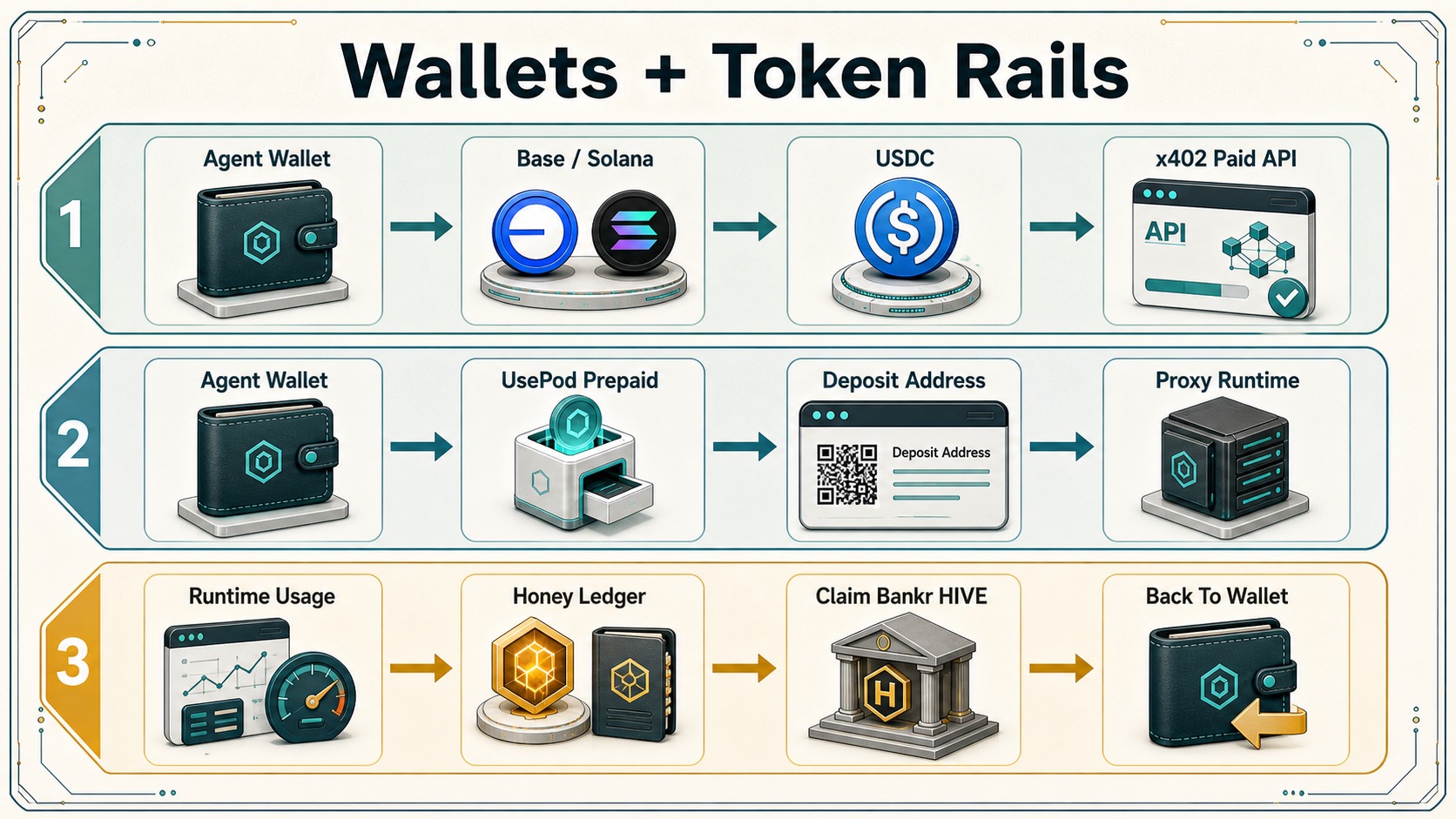
Wallets give agents controlled money rails.
They can hold capped budgets, token balances, prepaid inference deposits, and paid-request paths. Honey is a contribution record, Hivemind Cloud credits fund managed services, and HIVE remains an optional ecosystem token.
For the separation between Honey, Hivemind Cloud credits, HIVE, and treasury policy, see Honey, HIVE, And Treasury.
How It Works
- Wallet services live in
src/lib/services/wallet. - The unified crypto capability router lives in
src/lib/services/crypto-capability-router.ts. - Local wallet vault:
~/.hivemindos/wallet-vault.json, encrypted by~/.hivemindos/wallet-vault.keyorHIVEMINDOS_WALLET_VAULT_KEY. - Wallet records can be mirrored into the shared vault through
src/lib/services/obsidian/wallet-ledger.ts. - Crypto rail readiness and routing are exposed through
/api/crypto/capabilities. - Clear-signing reviews are exposed through
/api/crypto/clear-signing. - Local agent identity/listing records are exposed through
/api/crypto/agent-identity. - Crypto control reviews are exposed through
/api/crypto/risk-monitor. - Base, Robinhood Chain, and Solana wallet creation and balance reads are exposed through
/api/wallet/create,/api/wallet/balance, and/api/wallet/send. - Local Honey ledger/cache is in
src/lib/services/wallet/honey-ledger.ts. - Wallet-vault backup and restore logic is in
src/lib/services/wallet/wallet-vault-backup.ts. - MoneyClaw account checks live in
src/lib/services/wallet/moneyclaw-client.ts. - Official Honey ledger source lives in HivemindOS-controlled hosted-service infrastructure.
- Reward compute gateway source lives in HivemindOS-controlled hosted-service infrastructure.
- Managed-agent billing lives in
src/lib/services/managed-agent-billing.tsand/api/managed-agent/billing.
What Wallets Can Do
- Create Base, Robinhood Chain, and Solana wallet secrets for agent-scoped token rails.
- Read native/token balances.
- Send the wallet’s dollar stablecoin where configured, capped, and approved: USDC on Base/Solana, or USDG on Robinhood Chain.
- Store, recover, and explicitly export local wallet secrets.
- Validate MoneyClaw keys.
- Track UsePod prepaid token deposit details and runtime balance/route metadata when UsePod returns it.
- Spend hosted HivemindOS credits on managed UsePod inference when an official hosted gateway is configured. The gateway holds the UsePod payer token server-side, preserves streaming responses, charges upstream UsePod spend plus the configured HivemindOS platform fee, and refunds any unused per-request reservation.
- Spend hosted HivemindOS credits on managed Nansen research when no
NANSEN_API_KEYis configured. The official gateway holds the Nansen key server-side, charges the user’s hosted credits, records a receipt, and returns a derived brief. - Generate images, video, audio, music, speech, lip-sync, edits, and enhancements through hosted HivemindOS credits without configuring a media-provider key. The official gateway quotes the live provider request, adds 25%, reserves credits before generation, and refunds failures or unused reservation.
- Execute x402 paid requests through policy-aware helpers.
- Buy stocks from a prompt through Alpaca (a real brokerage, paper by default), Robinhood Agentic Trading (a dedicated brokerage account connected through Robinhood’s official OAuth MCP), on-chain tokenized xStocks (a USDC to xStock swap via Jupiter), or eligible Robinhood Chain Stock Tokens (a USDG swap through 0x on Robinhood Chain).
- Select and prepare the best available crypto rail for agent intents such as paid API calls, private transfers, Bankr trading, and LLM credit funding.
- Prepare crosschain swap, bridge, and payment intents through the same router, with Bankr as the active provider path and direct LI.FI/Open Intents adapters reserved as explicit future provider slots.
- Generate clear-signing reviews that show the action kind, endpoint, recipient, network, amount, cap, confirmation phrase, and blocking risks before execution.
- Register local agent identity records with wallet, ENS/ERC-8004 metadata, service endpoint, x402 endpoint, capabilities, and proofs.
- Run offline crypto risk checks over wallet policy, agent identity, required env-key presence, endpoint exposure, repo controls, DNS controls, and multisig posture.
- Observe runtime usage and submit privacy-safe Honey metadata.
- Hold spend-only Hivemind Cloud credits for no-BYOK managed agents.
- Return legacy ledger-only HIVE balances to Honey. Honey-to-HIVE exchange and claim paths remain closed unless a separately authorized hosted policy enables them.
Honey And Hivemind Cloud Credits
The ledger keeps contribution and purchased service value separate:
- Honey: one cumulative, non-transferable record earned from verified work, bounded peer recognition, and explicitly documented historical seed events. Source labels preserve provenance; they are not separate balances or classes of Honey. Honey is not automatically convertible to HIVE.
- Hivemind Cloud credits: funded service credits for HivemindOS-managed agents. These are spend-only, nontransferable, and nonredeemable.
Customer-facing billing shows ordinary dollar-denominated managed usage. This prevents a funding/cash-out loop and avoids presenting service credit as a token reward.
Lifetime Honey unlocks a larger daily allowance for HivemindOS free agents. The benefit starts at 10 Honey and grows through six levels to a maximum 2× request-and-token allowance. Honey from verified work, bounded peer recognition, and the documented historical launch seed all advances the same total and levels. Raw activity and ordinary chat volume do not earn Honey. If a workspace also has a HIVE staking benefit, HivemindOS uses whichever allowance multiplier is higher instead of stacking them. The allowance is an in-kind service benefit, not a spendable or withdrawable balance.
| Lifetime Honey | Level | Daily free-agent allowance |
|---|---|---|
| 10 | Contributor I | 1.10× |
| 50 | Contributor II | 1.20× |
| 150 | Contributor III | 1.35× |
| 500 | Contributor IV | 1.50× |
| 1,500 | Contributor V | 1.75× |
| 5,000 | Contributor VI | 2.00× |
Earn Honey From Telegram Contributions
Communities can publish bounded missions in Telegram for documentation, code, testing, support, tutorials, research, moderation, and similar useful work. Each mission states its Honey amount and required evidence. A contributor submits evidence, and an independent community reviewer must approve it before Honey is recorded. GitHub pull-request missions also wait for confirmation that the pull request merged.
To connect an account, first link and verify a wallet in HivemindOS. Then send /linkhoney to the community bot and enter its private one-time code in Wallets → Honey. /missions lists available work, /honey or /honey balance shows a private contribution summary, and /honeyboard shows the current seasonal leaderboard.
Any group member can recognize a specific useful contribution by replying with /honey <why>, using /honey @name <why>, or reacting to the message with 🏆 from Telegram’s reaction menu. The bot never places the trophy itself, so a 🏆 on a message always means a member chose to give recognition. Each accepted member recognition gives the recipient exactly 1 Honey. No HivemindOS connection is needed to give or receive: Honey banks to the recipient’s Telegram account right away, /honey balance shows it, and it transfers to their HivemindOS workspace automatically when they later connect. Connecting is one tap — Wallets → Honey → Connect Telegram opens the bot and pressing Start completes the link; sending /linkhoney for a one-time code remains available as a fallback. A giver can give up to three recognitions per UTC day—not 3 Honey of their own. Those recognitions reset daily and do not accumulate. The same pair can exchange only once per day in either direction, and a recipient can receive at most 5 Honey per day.
The 🏆 reaction uses the same hosted identity, cooldown, daily quota, pair, recipient, and replay checks as the typed command. Removing a trophy, adding an ordinary reaction, reacting anonymously, or reacting to a message whose author the bot cannot identify awards nothing. The bot does not send the message text to the hosted service. To use this shortcut, the bot must be a group administrator, Group Privacy must be disabled, and the group’s reaction settings must allow 🏆 (or all emoji). Telegram bots cannot change that group-wide reaction setting, so a group admin enables it once; /honey <why> remains the fallback.
The first seasonal leaderboard preserves historical HIVE-tip receiver rank at 1 Honey per 1,000,000 HIVE received. Mission, recognition, verified-work, and historical-seed labels show where Honey came from, but every Honey advances the same cumulative total and allowance levels. Telegram messages, ordinary reactions, invites, and raw activity do not earn Honey. Honey remains non-transferable and separate from HIVE tips, bounty escrow, and purchased Hivemind Cloud credits.
Hosted model messages are metered: each successful message is charged the upstream provider price × 1.25 (a 25% markup), with a $0.001 minimum per message. A short message on a cheap model hits the $0.001 floor; a longer message on a premium model costs proportionally more.
| Hosted model message | Charge |
|---|---|
| Minimum per message (floor) | $0.001 |
| Cheap model, short reply | ~$0.001 (floor) |
| Premium (Opus-class) model, ~400 output tokens | ~$0.038 (≈$0.030 upstream × 1.25) |
Prepaid cloud-credit accounts are debited the actual metered usage after each message. A raw x402 caller pays the estimated maximum for the request up front, bounded by max_tokens. The flat $0.001 is the floor and the fixed price for per-call tool routes — it is not the price of a typical model message.
The no-API-key flow is:
- The app quotes a managed run through
/api/managed-agent/billingusing a server-side pricing matrix and markup. - The user funds Hivemind Cloud credits through a verified supported payment rail.
- Funding credits are written only after provider-side settlement proof, such as a verified Stripe webhook.
- Managed compute uses HivemindOS-held provider keys server-side.
- The trusted runtime submits a signed debit to the Honey ledger based on verified usage.
The official ledger rejects browser-spoofed credits. Its /managed-billing/events endpoint requires either a billing HMAC signature or the operator admin token, dedupes idempotency keys, and refuses debits when the managed cloud-credit balance is insufficient.
Hosted Media Generation
The built-in hosted-media capability gives users and agents a no-provider-key path for generative media. Agents discover it as three separate capabilities so read operations stay automatic while new spend remains explicit:
hosted_media_cataloglists the live image, video, audio, music, speech, lip-sync, edit, and enhancement catalog.hosted_media_readquotes an exact model payload or polls an owned async job; neither operation creates new provider spend.hosted_media_generatesubmits a previously quoted request with a stable idempotency key and maximum debit.
The downloaded app calls the official hosted gateway through /api/hivemindos/media. It resolves the existing shared HivemindOS credit token locally but never returns that token to the caller. The private gateway owns the upstream provider credential, checks the live model catalog, calculates provider cost plus 25%, reserves the retail quote before submission, stores job ownership, and reconciles the exact provider charge. Provider failures are fully refunded; unused reservation is returned; and the user’s debit never exceeds the approved maximum even if the provider later reports a higher charge.
Zero Human Company policy is task-scoped. When hosted media is generated for an active company Work Board task, the caller passes that task context and the local route validates company membership, active status, company freeze, member/company budgets, and approval threshold. Ordinary media requests use only the selected wallet’s policy; company membership alone never changes them. A frozen company, exhausted task budget, approval requirement, low hosted balance, invalid quote, or reused request outside the idempotency contract fails before additional provider spend.
Paid Agent x402 Gateway
HivemindOS can expose a curated agent as an OpenAI-compatible paid endpoint. For official monetized agents, this endpoint should run on HivemindOS-controlled hosted infrastructure, not inside the downloaded desktop app.
The official default hosted paid agent is a metered (prepaid) agent: it charges the upstream provider price × 1.25 (a 25% markup), with a $0.001 minimum per message. Fixed per-call routes (a per-call billing mode) charge a flat priceUsd instead. Self-hosted sellers can set their own price and billing mode, but official HivemindOS pricing comes from the hosted endpoint, not from a local app setting.
- Downloaded apps should call
GET /api/official-paid-agents/<slug>/chat/completionsfor official hosted-agent readiness andPOST /api/official-paid-agents/<slug>/chat/completionsfor paid calls. This local route is only a buyer/proxy path to HivemindOS-hosted infrastructure. - Self-hosted sellers can expose
GET /api/paid-agents/<slug>/chat/completionsfor non-secret readiness, price, runtime, provider, model, and supported runtime/provider matrices. - Self-hosted sellers can expose
POST /api/paid-agents/<slug>/chat/completionsas an OpenAI-style chat completion body that requires x402 payment before it calls the internal/api/chat/agent-runtimeroute. - Successful calls settle x402 after the agent response is produced, return a
PAYMENT-RESPONSEheader, and append a local paid-agent receipt for operator accounting. - Stream requests are accepted, but the gateway settles first and then returns a single completed Server-Sent Events response. This keeps settlement atomic for paid calls.
Official downloaded-app setup is intentionally light. Configure only the hosted base URL:
HIVEMINDOS_OFFICIAL_PAID_AGENT_BASE_URL=<https-hivemindos-hosted-base-url>
The packaged default is the official Cloudflare Worker at https://hivemindos-paid-agent-gateway.hivemindos.workers.dev, so most downloaded apps do not need local configuration. The env variable is an override for staging, enterprise, or self-hosted official-compatible deployments.
The official client route requires a public HTTPS base URL by default and forwards only safe request metadata plus x402 payment/idempotency headers. It does not contain the official payTo, facilitator credentials, model provider keys, or HONEY/HIVE entitlement logic.
The official hosted paid-agent gateway exposes the same hosted seller route (/api/paid-agents/<slug>/chat/completions), verifies and settles x402 at the edge, writes receipt metadata, and forwards paid OpenAI-compatible chat bodies to a trusted upstream runtime URL. The downloaded app should point HIVEMINDOS_OFFICIAL_PAID_AGENT_BASE_URL at that hosted URL.
Base Builder Code attribution is optional for x402 calls on Base mainnet. Set a Builder Code only on the authoritative caller or seller infrastructure that should receive attribution:
HIVEMINDOS_X402_CLIENT_BUILDER_CODE=<base-builder-code>adds client-sidesattribution to compatible/api/wallet/x402payments made from the local wallet oneip155:8453.HIVEMINDOS_PAID_AGENT_BUILDER_CODE=<base-builder-code>adds seller-sideaattribution to paid-agent 402 requirements oneip155:8453, including the hosted Worker.HIVEMINDOS_X402_BUILDER_CODE=<base-builder-code>is a shared fallback for deployments that intentionally want one code for both roles.
Builder Codes must be lowercase letters, digits, or underscores, 1-32 characters. They are public attribution identifiers, not secrets. The app ignores them on non-Base-mainnet networks.
Mainnet paid-agent revenue also needs a mainnet-capable facilitator. Paid-agent gateways default to Base mainnet with the CDP facilitator at https://api.cdp.coinbase.com/platform/v2/x402 and require CDP_API_KEY_ID plus CDP_API_KEY_SECRET. Testnet mode is disabled by default; set HIVEMINDOS_PAID_AGENT_TESTNET_MODE=true to opt into Base Sepolia with https://x402.org/facilitator for development. The CDP path uses @coinbase/x402 to generate request-specific facilitator JWT auth headers.
Production setup is fail-closed. For a hosted or self-hosted seller gateway, configure:
HIVEMINDOS_PAID_AGENT_GATEWAY_ENABLED=trueHIVEMINDOS_PAID_AGENT_SELLER_MODE=self-hostedHIVEMINDOS_PAID_AGENT_PAY_TO=<recipient-address>- Optional:
HIVEMINDOS_PAID_AGENT_TESTNET_MODE=truefor Base Sepolia development; leave unset orfalsefor production Base mainnet - Optional:
HIVEMINDOS_PAID_AGENT_FACILITATOR_URL=<x402-facilitator-url>only when overriding the default CDP or testnet facilitator CDP_API_KEY_ID=<cdp-api-key-id>andCDP_API_KEY_SECRET=<cdp-api-key-secret>for the CDP facilitatorHIVEMINDOS_PAID_AGENT_FACILITATOR_BEARER=<facilitator-bearer>for non-CDP facilitators that use a static bearer tokenHIVEMINDOS_PAID_AGENT_PRICE_USD=<price-per-call>- Optional:
HIVEMINDOS_PAID_AGENT_BUILDER_CODE=<base-builder-code> HIVEMINDOS_PAID_AGENT_PROFILE_JSON=<json>orHIVEMINDOS_PAID_AGENT_PROFILE_PATH=<path-to-exported-profile>
For multiple products, use HIVEMINDOS_PAID_AGENT_CATALOG_JSON or HIVEMINDOS_PAID_AGENT_CATALOG_PATH with entries containing slug, description, priceUsd, payTo, facilitatorUrl, optional builderCode, and a curated agent profile. The route never exposes provider tokens or wallet secrets.
Do not package an official payTo address into the downloadable app as the source of truth. A local app install is controlled by the user: they can edit env, config, app bundles, and local routes. If official revenue or feature access depends on the payment, the app must call a hosted HivemindOS resource server, or a HivemindOS backend must verify the x402 settlement against the expected official payTo, network, amount, and resource before granting server-side value. Local self-hosted seller mode is for operators who intentionally want to sell their own agent endpoint and receive payment to their own address.
If a user changes HIVEMINDOS_OFFICIAL_PAID_AGENT_BASE_URL, they are changing which hosted service their app talks to; that must not grant official HivemindOS cloud entitlement by itself. Official entitlements, quotas, receipts, Hivemind Cloud credits, HIVE-funded payment credits, and enterprise usage state must be issued by HivemindOS-controlled backend services after verified settlement.
Optional accounting:
HIVEMINDOS_PAID_AGENT_REWARD_HONEY_ENABLED=trueis a legacy-named compatibility flag that lets the trusted runtime submit signed Honey contribution observations for the agent’s response.HIVEMINDOS_PAID_AGENT_MIRROR_MANAGED_HONEY=trueis a legacy-named compatibility flag that mirrors each settled x402 call into the internal Cloud-credit ledger as an equal credit/debit pair for operator reporting.- x402 remains an external per-call payment rail; Hivemind Cloud credits remain ordinary spend-only managed-service value.
Company Product Offers
Self-hosted sellers can also publish a Zero Human Company catalog product as a one-shot x402 offer:
GET /api/paid-agents/offerslists published offers with prices and readiness (non-secret env names only).GET /api/paid-agents/offers/<slug>serves one offer’s public info; the price always comes from the company’s server-side product catalog, never from the buyer’s request.POST /api/paid-agents/offers/<slug>requires x402 payment and returns an order acknowledgment; buyers can include a boundedcontact/notefor fulfillment.- A catalog entry (
HIVEMINDOS_PAID_AGENT_CATALOG_JSON) or the default entry (HIVEMINDOS_PAID_AGENT_COMPANY_ID) can also name acompanyIdso per-call chat revenue attributes to a company.
Offers reuse the paid-agent seller gate and payment env verbatim (HIVEMINDOS_PAID_AGENT_SELLER_MODE, HIVEMINDOS_PAID_AGENT_PAY_TO, facilitator settings). Settled purchases append the same local receipts and bridge into the company revenue ledger idempotently — see the Zero Human Companies doc’s Automated Revenue Rail section.
Wallet-Paid HivemindOS Models
The model picker includes HivemindOS Models for users who want managed model calls without bringing provider API keys. It is a wallet-paid provider:
- The selected agent’s persisted local x402 wallet pays each official hosted model call.
- The official hosted default is metered: upstream provider price × 1.25 (25% markup), with a $0.001 minimum per message. The wallet is charged the estimated maximum for each call up front, bounded by
max_tokens. - The app uses the same wallet Spend, max-payment, auto-use, network, and governance policy as other x402 paid requests.
- The local route is
POST /api/hivemindos/models/chat/completions, with model idshivemindos/auto,hivemindos/fast,hivemindos/frontier, andhivemindos/research. - The route pays the official hosted paid-agent resource through
/api/official-paid-agents/<slug>/chat/completions, then returns an OpenAI-compatiblechat.completionresponse to the normal chat streamer. - Users do not provide a model API key, provider key, or
payToaddress for official HivemindOS Models.
Optional staging, enterprise, or self-hosted official-compatible deployments can set HIVEMINDOS_WALLET_PAID_MODEL_AGENT_SLUG=<slug> to choose which hosted paid-agent product slug backs the picker. The slug selects a hosted resource; it does not define the recipient or price inside the downloaded app.
This is still a server-authoritative commercial flow. The downloaded app loads the user’s encrypted local wallet only to sign the x402 payment under that wallet’s policy. Official price, recipient, payment requirements, settlement, receipts, quotas, provider keys, and upstream model access stay in HivemindOS-controlled hosted infrastructure. A local app setting or request body cannot redirect official HivemindOS model revenue.
For one-click calls, the agent needs a local custody Base/Base Sepolia/Robinhood Chain/Solana wallet with Spend enabled, provider x402, enough accepted stablecoin and native gas, and Allow auto-use enabled under the wallet’s cap. Personal user wallets do not auto-spend; they still require explicit payment confirmation. Robinhood Chain x402 payments only work when the paid endpoint explicitly accepts eip155:4663; otherwise HivemindOS reports that no matching payment option was available.
Trading Platform Fees
The downloadable app cannot be the authority for official HivemindOS revenue: users can edit local config, patch local routes, or rebuild the app. For the official build, local wallet rails read public fee policy from HivemindOS-hosted infrastructure by default:
HIVEMINDOS_PLATFORM_FEE_POLICY_URL=https://hivemindos-paid-agent-gateway.hivemindos.workers.dev/api/platform-fees/config
That hosted policy returns source-specific rates, minimums, caps, supported rails, and recipients. Ordinary wallet transfers and externally sourced company revenue carry no HivemindOS platform fee. Current default rates are 0.20% for DEX swaps, 0.10% for supported live stock/tokenized-stock execution, and 0.50% for ordinary paid x402 or private-payment execution, with a $0.01 minimum and $10 maximum where a fee applies. The fee is quoted before confirmation and collected as a separate stablecoin transfer only after the main action succeeds. Paper trades, read-only checks, rejected actions, and no-payment x402 calls do not charge a platform fee. HivemindOS-hosted MiroShark proxy runs also exclude the separate local fee because their retail price already includes the hosted-service spread.
Zero Human Company revenue events are recorded through /api/company-revenue and shown in the company Treasury tab. Revenue earned outside HivemindOS is not charged. A future marketplace-sourced or HivemindOS-billed sale may include a disclosed fee from the hosted settlement policy, but local revenue recording itself does not create a company claim.
Simple examples:
| Action | Amount | Fee |
|---|---|---|
| Ordinary wallet send | $100 |
$0.00 |
| DEX swap | $100 |
$0.20 |
| Supported live stock or tokenized-stock execution | $100 |
$0.10 |
| Paid x402 or private-payment execution | $100 |
$0.50 |
| HivemindOS-hosted MiroShark x402 simulation | $1.20 |
No extra local platform fee; $0.20 proxy spread is included |
| Externally sourced Zero Human Company revenue | $1,000 |
$0.00 |
Self-hosted operators can override the hosted policy for their own install by setting HIVEMINDOS_TRADING_PLATFORM_FEES_ENABLED or local recipient variables. Fee-rate defaults alone keep using the hosted official policy:
HIVEMINDOS_TRADING_PLATFORM_FEES_ENABLED=trueHIVEMINDOS_TRADING_PLATFORM_FEE_BPS=25for a 0.25% uniform self-hosted fallbackHIVEMINDOS_COMPANY_REVENUE_SHARE_BPS=0to keep external company revenue freeHIVEMINDOS_TRADING_PLATFORM_MIN_FEE_USD=0.01for a minimum feeHIVEMINDOS_PLATFORM_MAX_FEE_USD=10for the default capHIVEMINDOS_PLATFORM_FEE_RECIPIENT_EVM=<evm-address>for Base and Robinhood Chain wallet sends, EVM DEX swaps, Robinhood Chain Stock Token swaps, live Alpaca and Robinhood Agentic fee collection, public x402, and Veil-backed private paymentsHIVEMINDOS_PLATFORM_FEE_RECIPIENT_SOLANA=<solana-address>for Solana DEX, xStocks swaps, and Solana x402 payments
Some Trading tab capabilities are not safely fee-able from the local app alone. Bankr actions and MoneyClaw card payments need a hosted/proxy fee path, provider-native partner fee support, or a contract-based settlement layer because the local app does not own a deterministic local-wallet settlement for those rails. Do not present local fee settings as official HivemindOS-wide revenue enforcement: a downloaded app is user-controlled and can be modified. Strong official enforcement must happen in hosted HivemindOS infrastructure or in a verifiable third-party settlement flow that checks recipient, network, amount, resource, and receipt server-side.
Runtime policy:
- Recommended public runtime:
hivemind-os, because it can route to local OpenAI-compatible models, Bankr LLM, Venice, UsePod, OpenRouter, and Hive Fusion while keeping provider keys server-side. - Allowed with curated profiles:
hermesandopenclaw, when the profile has a safe gateway and no unintended wallet/workspace tools. - Internal by default:
codex,claude-code,opencode,openhands,aider,aeon, andevo. Use these as scoped managed jobs with explicit workspace/task limits rather than public per-call chat.
Shared vault access and agent wallet tools are off unless the paid-agent profile explicitly includes them. Do not place secrets, private wallet material, or local workspace paths in public paid-agent config.
Crypto Capability Router
Agents should start with /api/crypto/capabilities when they need a money rail but do not need to force a provider. The router reports readiness for Bankr, local Hyperliquid, x402, Veil Cash, MoneyClaw, and UsePod, then maps a natural intent to the best configured rail.
Supported intents:
statusportfolioreceivesendprivate-transferpaid-apiprivate-paid-apitradecrosschain-swapbridgecrosschain-paymenttoken-launchpolymarkethyperliquidautomationnftagent-jobcard-paymentfund-llm-credits
The router has three modes:
status: return a capability map and provider readiness.select: choose a provider for an intent without side effects.prepare: return the existing provider endpoint, draft request body, missing readiness, approval requirement, confirmation label, clear-signing review, and crosschain plan when relevant.
It does not execute spending. Execution remains with the existing gated routes such as /api/trading/hyperliquid, /api/wallet/x402, /api/wallet/veil/x402, /api/wallet/veil/transfer, /api/wallet/send, /api/wallet/moneyclaw, /api/usepod/status, /api/usepod/deposit-transaction, and /api/bankr/llm-credits, or with the Bankr skill/CLI for provider-mediated trades.
Crosschain support is intent-first:
crosschain-swap,bridge, andcrosschain-paymentprepare Bankr action drafts today.- The crosschain plan returned by
preparekeeps LI.FI and Open Intents as named provider slots, marked planned until direct adapters and approval gates are added. - xStocks remain on the existing buy-stock rail because they require the verified Solana token allowlist rather than a generic bridge quote.
Clear signing is a review layer, not a signer:
/api/crypto/clear-signingaccepts an x402, send, private-transfer, Bankr action, crosschain intent, identity claim, or raw transaction draft.- The response includes normalized counterparty, amount, network, cap, risks, side effects, confirmation text, and a fingerprint.
- Blocking risks such as invalid recipient format, cap mismatch, or x402 network mismatch should stop execution before any provider route is called.
Agent identity is local-first:
/api/crypto/agent-identitystores local records under the HivemindOS home store with agent id, display name, handle, wallet address, ENS name, ERC-8004 entity id, service endpoint, x402 endpoint, capabilities, proofs, status, and fingerprint.- These records make ENS/ERC-8004-style discovery a first-class HivemindOS concept before any onchain marketplace adapter is configured.
- Draft records may be useful internally, but published records should have at least one identity anchor and a service or x402 endpoint.
Risk monitoring is an offline control review:
/api/crypto/risk-monitorevaluates supplied metadata for wallet caps, Veil auto-send caps, identity anchors, required env-key presence by key name only, public endpoint HTTPS, Tailnet exposure posture, repo controls, DNS controls, and multisig controls.- It returns a score, severity, findings, and recommended actions. It does not scan secrets, print env values, or mutate infrastructure.
For external agents, setup also installs the hivemind-mcp stdio server. Its crypto tools proxy this same dashboard API:
crypto_capabilitiesselect_crypto_railprepare_crypto_actionreview_crypto_actionhyperliquid_tradeagent_crypto_identitycrypto_risk_monitor
The dashboard app must be running for these API and MCP tools to work. An agent can use them from Codex, Claude, Hermes, or another runtime without the user actively chatting in the dashboard, but the local HivemindOS API still needs to be reachable and authenticated. If HivemindOS is not running, this router is not a standalone wallet daemon; agents should only use provider-specific CLIs or skills that are independently available.
Credential readiness is reported by key name and status only. The router must not print, store in notes, or return private keys, seed phrases, API keys, card details, wallet secrets, or raw env values. The separate wallet export action is an explicit user-initiated download path, not a capability-router behavior.
Wallet And Token Rails
The Wallets tab treats each agent wallet as a set of payment rails:
- Local Base, Robinhood Chain, or Solana wallets hold capped funds for direct sends, swaps, trades, and x402 requests.
- Stablecoin sends enforce each agent’s max-payment policy before signing: USDC on Base/Solana, USDG on Robinhood Chain.
- MoneyClaw keys can be saved per agent or shared across agents after the API key is validated.
- UsePod agents show a prepaid rail with deposit address, last balance, last route, model count, and test status from the runtime metadata.
- x402 requests use the local wallet policy, max-payment cap, and explicit confirmation text for risky sends.
- When
HIVEMINDOS_X402_CLIENT_BUILDER_CODEis set, compatible Base mainnet x402 endpoints can record the client Builder Code on settlement calldata.
Token-facing surfaces:
- Base, Robinhood Chain, and Solana addresses are treated as operational agent wallets, not user custody wallets.
- Robinhood Chain wallets can hold USDG, WETH, and official Stock Token contracts. Stock Token trades may still be blocked by upstream liquidity, eligibility, or legal restrictions; HivemindOS surfaces that block instead of routing around it.
- UsePod deposit addresses are shown as prepaid inference token rails when the selected agent uses the UsePod provider.
- Honey is tracked as a non-transferable contribution record. HIVE may appear as a ledger-only legacy balance; new exchange and transfer paths remain closed unless a separately authorized conversion policy is enabled.
- x402 uses token/payment policy around requests instead of giving runtimes unrestricted wallet access.
Trade Tab
For the full, dedicated trading reference — every crypto rail, stock venue, agent/MCP access path, and the governance model — see the Trading docs. This section is the wallet-context summary.
The Trade tab is a dedicated action surface for buying, selling, and swapping. It is segmented into Crypto and Stocks and acts on a selected agent’s governed wallet. It complements the Wallets tab, which stays focused on accounts, rails, balances, and governance.
- Crypto is capability-first: it reads
/api/crypto/capabilitiesto show every supported action (swap/trade, Hyperliquid spot/perps, prediction markets, bridge, token launch, NFT, send, receive, private transfer, paid API, fund LLM credits) with live readiness, lets the user prepare an action to see the clear-signing review, and executes through the same hardened provider endpoints (/api/trading/hyperliquid,/api/bankr/actions,/api/wallet/send,/api/wallet/x402,/api/wallet/veil/*, and others). The capability router picks the configured provider, so users express intent rather than naming a rail. - Stocks buys and sells through the unified trade rail below.
The tab lives under src/features/dashboard/views/trade/ and is reachable from the left navigation shelf.
Hyperliquid Trading
HivemindOS can trade Hyperliquid spot and perpetual futures from a local EVM wallet. Local Hyperliquid uses the selected wallet’s own Hyperliquid account and collateral, while Bankr-mediated Hyperliquid uses Bankr’s connected trading wallet. The app should always show which source of funds is being used before you confirm.
In the Trade tab, local Hyperliquid supports spot and perp markets; long/short and buy/sell direction; market, limit, trigger, and TWAP orders; slippage guards; reduce-only closes; open-order management; leverage and isolated margin controls; spot/perp transfers; USDC sends; spot sends; withdrawals; status refresh; quotes; builder-fee approval; and action-specific confirmations.
Official HivemindOS builds charge a small Hyperliquid builder fee on eligible filled local orders: 0.5 bps (0.005%) of filled notional. The builder fee is approved separately from an order, so a wallet that has not approved the current fee cannot trade until the approval step is complete. After approval, HivemindOS attaches the builder code automatically to eligible orders; users do not need to find or paste a builder code.
For the full user-facing guide, including fees, funding, liquidation risk, supported markets, and agent behavior, see Hyperliquid Trading.
Stock Trading (Four Venues)
Agents and the Trade tab can buy and sell stocks through one unified trade rail with four venues:
alpaca: a real, regulated US brokerage. Market orders go through the Alpaca Trading API. It defaults to paper (simulated) trading, and live trading is reachable only when the wallet setsalpacaPaperto false. Paper and live are SEPARATE Alpaca accounts with SEPARATE credentials, so they load from different shared-hive env names: paper readsALPACA_PAPER_API_KEY_ID/ALPACA_PAPER_API_SECRET_KEY(falling back to the live names for backward compatibility), live readsALPACA_API_KEY_ID/ALPACA_API_SECRET_KEY. Values are never stored in project files.robinhood-agentic: a dedicated Robinhood Agentic brokerage account connected through Robinhood’s official OAuth Trading MCP. HivemindOS can read the authorized account through a bounded allowlist, asks Robinhood to review a long-equity market order, and requiresCONFIRM_BUYorCONFIRM_SELLbefore placement. Raw mutation tools are not handed directly to agents.xstocks: on-chain tokenized equities issued by Backed Finance. A buy swaps USDC into the verified xStock SPL token through Jupiter; a sell sizes the position from the current USDC price and swaps the xStock back into USDC (both legs ExactIn, which routes reliably for thin tokenized-equity pools where exact-out often has no route). Both are signed by the agent’s existing local Solana wallet and require a Solana mainnet wallet plus a little SOL for fees and token-2022 account rent.robinhood-chain: eligible Stock Tokens traded on Robinhood Chain from the agent’s self-custody wallet. Buys swap USDG into the verified token through 0x and sells return the position to USDG; the wallet also needs ETH for gas. This on-chain venue is separate from the Robinhood Agentic brokerage account.
How it works:
- The rail lives in
src/lib/services/trading/buy-stock.ts(executeStockTrade/discoverStockTradeQuote, withexecuteBuyStockkept as a buy-side wrapper). - The verified mint allowlist lives in
src/lib/config/xstocks-tokens.ts. xStock tickers resolve only through this allowlist, never live symbol search, because Solana carries many scam copycats reusing eachAAPLx-style symbol. Every mint is Jupiter-verified and uses the officialXsvanity address prefix. - Two entry points: the chat runtime handles natural requests such as
buy $25 of AAPL on xstocksas a draft, confirm, execute card; the Trade tab callsPOST /api/trading(action: 'quote' | 'execute' | 'portfolio',side: 'buy' | 'sell'). The route resolves the acting agent’s wallet server-side and never trusts a client-supplied policy.GET /api/tradingreports per-mode venue readiness (separatepaperandliveAlpaca credential state) and trade-ready agents. - A buy requires
CONFIRM_BUY, a sell requiresCONFIRM_SELL. Every trade honors a per-trade USD cap (maxTradeUsd, falling back to the per-payment cap). A buy passes wallet rolling daily/monthly budgets and approval escalation; a sell is an inflow and never debits rolling budgets. Company freeze and budgets apply only when the trade belongs to an active company Work Board task. - The Stocks screen has a Paper-trading toggle and a portfolio panel. The toggle flips the Alpaca account between paper (simulated) and live; paper orders run against
https://paper-api.alpaca.marketsand never buy the real stock. The portfolio panel readsaction: 'portfolio'(Alpaca/v2/account+/v2/positions) for the selected mode and shows equity, cash, buying power, and open positions with unrealized P/L. The toggle can only force paper from the client — it can never escalate a paper-only agent to live: the server re-derives the effective mode from the persisted policy, so live is reachable only when the wallet opted in (alpacaPaper:false). - Venue and mode are configured per agent in the Wallets tab: venue (Off, Alpaca, Robinhood Agentic, xStocks, or Robinhood Chain), Alpaca paper vs live, and max per trade.
Safety:
- Alpaca defaults to paper. Live is opt-in per wallet, and the Stocks-screen toggle cannot move a paper-only agent to live.
- Robinhood Agentic requires an authorized dedicated Agentic account, Robinhood’s own pre-trade review, HivemindOS confirmation, and an acting wallet capable of paying the quoted platform fee.
- xStock trades resolve only verified mints and require a Solana mainnet wallet.
- Robinhood Chain Stock Token trades resolve only verified contracts and may still be blocked by upstream liquidity, eligibility, or legal restrictions.
tradeactivity is recorded in the spend ledger like every other rail.
Tests:
pnpm test:buy-stockchecks the xStocks allowlist invariants and live Jupiter routability.pnpm e2e:buy-stock-alpacaruns an Alpaca paper-order round-trip when keys are present.
Wallet Vault Backup
HivemindOS stores local wallet key material under ~/.hivemindos/wallet-vault.json, encrypted by ~/.hivemindos/wallet-vault.key unless HIVEMINDOS_WALLET_VAULT_KEY is configured. The backup route keeps that local, but still recoverable:
GET /api/wallet/vault-backupreports whether the vault, key material, encrypted backup, GPG, and recipient are available.POST /api/wallet/vault-backuprefreshes or restores the encrypted backup.- Backup placement prefers
HIVE_WALLET_VAULT_BACKUP_DIR, thenHIVE_ENV_BACKUP_DIR, then the configured secure notes folder. - Recipients can come from
HIVE_WALLET_GPG_RECIPIENT,HIVE_ENV_GPG_RECIPIENT, or public-key files in the secure folder. - Restore requires local GPG and a supported backup format. The route does not silently invent missing key material.
- The backup file, normally
hive.wallet-vault.gpg, contains the encrypted wallet vault plus the matching vault key material so user and agent wallets can be restored together on another trusted machine. - The adjacent
hive.wallet-vault.mdnote is metadata only; it lists wallet ids, addresses, networks, and backup paths, not plaintext wallet secrets.
Wallet Secret Export
Wallet export is available for local-custody user wallets and agent wallets from the Wallets screen. Export requires dashboard authentication and the confirmation phrase EXPORT_WALLET_SECRET, then downloads a local text file instead of rendering the secret in the dashboard.
POST /api/wallet/exportreturns the selected local wallet secret only after the explicit confirmation phrase.- Recovery-phrase imports export the stored recovery phrase where HivemindOS still has that phrase; derived Solana records export their derived private key because that is the stored spendable secret.
- View-only browser/public-address wallets do not have local secrets and cannot be exported.
Honey Paths
Honey is one non-transferable contribution and recognition record. Verified-work, mission, peer-recognition, and historical-seed labels preserve provenance, but every Honey adds to the same lifetime total and allowance levels. Honey is not cash, purchased Cloud credit, HIVE, company ownership, a revenue claim, or a promise of a future reward. Official conversion and claim routes fail closed unless a separately authorized hosted policy enables them.
Local observation:
- The dashboard reads supported runtime usage.
- It submits capped metadata without prompts, responses, files, wallet keys, local paths, machine names, or Tailnet IPs.
Trusted usage measurement:
- The official compute gateway exposes an OpenAI-compatible endpoint.
- Requests are forwarded through Bankr/OpenRouter-compatible routing.
- Provider usage is read server-side.
- Receipts are signed and submitted to the official Honey ledger as reviewed contribution evidence.
Contribution policy:
POST /api/honey-ledgerwithaction: "observe"samples supported runtime usage and records Honey once per event.action: "exchange"andaction: "claim-bankr-hive"return HTTP 403 by default. Both the app and hosted ledger fail closed unless an authorized Honey-to-HIVE conversion policy is enabled.action: "return-to-honey"moves old ledger-only HIVE balances back to Honey.
Main Code Paths
src/lib/services/wallet/**src/lib/services/trading/buy-stock.tssrc/lib/config/xstocks-tokens.tssrc/lib/services/crypto-capability-router.tssrc/lib/services/crypto/**src/lib/services/shared-hive-env.tssrc/app/api/crypto/capabilities/route.tssrc/app/api/crypto/clear-signing/route.tssrc/app/api/crypto/agent-identity/route.tssrc/app/api/crypto/risk-monitor/route.tssrc/lib/services/obsidian/wallet-ledger.tssrc/app/api/trading/route.tssrc/lib/services/trading/buy-stock.tssrc/features/dashboard/views/trade/**src/app/api/wallet/vault-backup/route.tssrc/app/api/wallet/moneyclaw/route.tssrc/app/api/wallet/**scripts/hivemind-mcpsrc/app/api/honey-ledger/route.tssrc/app/api/runtime-usage/route.tssrc/features/dashboard/hooks/use-wallet-files-controller.tsxsrc/components/wallet/**- Official hosted Honey ledger endpoint
- Official hosted compute gateway endpoint